

IPTV Smarters Not Working? Here’s How to Fix It Fast (UK Guide)
IPTV Smarters not working? You’re in the right place. Whether the app won’t load, your streams keep buffering, or your playlist has disappeared, this guide walks you through every common fix — step by step, in plain English.
We’ve covered both IPTV Smarters and IPTV Smarters Pro, and the fixes work across Firestick, Android, Smart TV, and Windows. Let’s get you back to streaming.
First: Is it the app or your subscription?
Before you start changing settings, it’s worth figuring out whether the problem is with IPTV Smarters itself or with your IPTV subscription. This saves you a lot of time.
Here’s a quick way to tell:
- Open your IPTV provider’s website or contact them directly and ask if there are any server issues
- Try loading your M3U URL in a different IPTV player — if it works there, the problem is the Smarters app
- Try logging in on a different device — if it works there, the problem is device-specific
Why is IPTV Smarters not working? Quick diagnosis
Use this table to jump straight to the fix you need:
| Symptom | Most likely cause | Go to |
|---|---|---|
| App won’t open or crashes | Outdated app version or corrupted cache | Fix 3 or Fix 5 |
| Streams buffering constantly | Slow internet or ISP throttling | Fix 1 or Fix 6 |
| Black screen on playback | Cache issue or VPN conflict | Fix 5 or Fix 6 |
| Playlist not loading | Expired M3U URL or wrong credentials | Fix 4 |
| Error after app update | Corrupted install | Fix 7 |
| Everything was fine, now nothing works | Provider server issue | Fix 8 |
Fix 1: Check your internet connection
IPTV streaming is more demanding than regular browsing. You need a stable, fast connection to watch without interruptions.
- HD streams require at least 10 Mbps
- 4K streams need 25 Mbps or more
- Live TV is more sensitive to latency than on-demand content
Run a quick speed test at fast.com or speedtest.net. If your speeds look fine but you’re still buffering, try switching from Wi-Fi to a wired ethernet connection — this alone fixes the problem for a lot of UK users, especially those on older routers.
Fix 2: Restart the app and your device
It sounds obvious, but a full restart clears temporary glitches that cause IPTV Smarters to freeze or fail silently.
- Force-close IPTV Smarters completely (don’t just minimise it)
- Hold down the power button on your device and select Restart — not just Sleep
- Wait 60 seconds before reopening the app
On Firestick: press and hold the Home button, go to Settings > My Fire TV > Restart.
Fix 3: Update IPTV Smarters to the latest version
Running an outdated version is one of the most common causes of IPTV Smarters not working — especially after your provider updates their servers.
- Android / Android TV: open the Play Store, search IPTV Smarters Pro, tap Update if available
- Firestick: since the app is sideloaded, you’ll need to re-download the latest APK from the official IPTV Smarters website and reinstall
- iOS: check the App Store for any pending updates
Always download updates from official sources only. Third-party APK sites can bundle malware with the install file.
Fix 4: Check your playlist / M3U URL
If your streams aren’t loading at all — but the app opens fine — the issue is almost always with your playlist.
- Open IPTV Smarters and go to your playlist settings
- Check that your M3U URL or Xtream Codes credentials are entered correctly — no extra spaces, correct capitalisation
- Copy your M3U URL and paste it into a browser — if it loads a text file, it’s working; if it returns an error, your subscription may have expired
If your subscription has expired or your credentials have changed, contact your IPTV provider directly. If you’re one of our subscribers and you’re having trouble, get in touch with our support team and we’ll sort it out quickly.
Fix 5: Clear the app cache and data
A bloated or corrupted cache is one of the most common reasons IPTV Smarters stops working — causing freezing, crashing, or a black screen.
On Firestick:
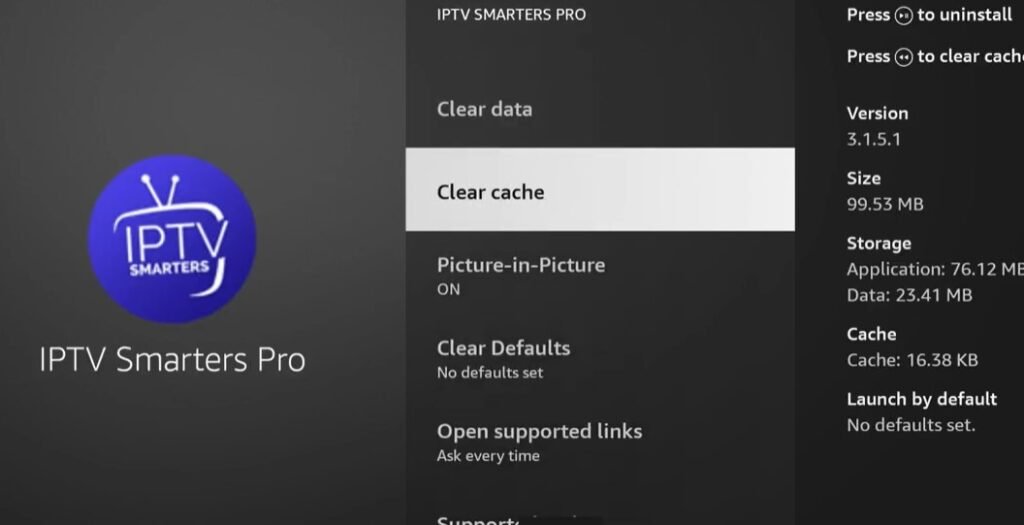
- Go to Settings > Applications > Manage Installed Applications
- Find IPTV Smarters Pro and select it
- Tap Clear Cache, then Clear Data
- Reopen the app and re-enter your playlist details
On Android:
- Go to Settings > Apps > IPTV Smarters Pro
- Tap Storage > Clear Cache > Clear Data
Important: clearing data will remove your saved playlists. Before you do this, note down your M3U URL or Xtream Codes credentials so you can re-enter them afterwards.
Fix 6: Check your VPN settings
VPNs and IPTV have a complicated relationship — sometimes you need one, sometimes it’s the thing causing the problem.
If you’re not using a VPN:
Some UK internet service providers — including Virgin Media and BT — are known to throttle IPTV traffic during peak hours. If you’re consistently experiencing buffering between 6pm and 10pm, your ISP may be throttling your connection. Using a reliable VPN can bypass this.
If you’re already using a VPN:
Some IPTV providers block VPN IP addresses to prevent abuse. If your streams stopped working after you enabled a VPN, try disabling it and connecting directly. If that fixes it, either whitelist your IPTV app in your VPN’s split-tunnelling settings, or try a different VPN server location.
Fix 7: Reinstall IPTV Smarters completely
If IPTV Smarters is not working even after clearing the cache, a full reinstall is the next step. This removes any corrupted files that a cache clear can’t fix.
- Uninstall IPTV Smarters Pro from your device completely
- Restart your device
- Download a fresh copy from the official source — Play Store, App Store, or the official IPTV Smarters website for Firestick
- Reinstall and re-enter your playlist credentials
Fix 8: The problem might be your provider’s servers
If IPTV Smarters is still not working after trying everything above, the issue is likely on your provider’s side — not yours. Server downtime, maintenance windows, and overcrowded servers are all common causes of IPTV Smarters Pro not working.
- Check if your provider has a status page, Telegram channel, or Facebook group — many UK IPTV providers post updates there
- Contact your provider’s support directly with your username and the specific error you’re seeing
- If your provider is unresponsive or frequently down, it may be time to switch to a more reliable service
IPTV Smarters not working: Frequently asked questions
Why does IPTV Smarters keep buffering?
Buffering is usually caused by a slow or unstable internet connection, ISP throttling, or an overloaded provider server. Try a wired connection, run a speed test, and check if the issue happens at the same time every day — that’s a sign of peak-hour throttling.
Why is IPTV Smarters showing a black screen?
A black screen is most often caused by a corrupted app cache or a VPN conflict. Clear the app cache first (Fix 5), and if that doesn’t work, check your VPN settings (Fix 6).
IPTV Smarters Pro stopped working after an update — what do I do?
Updates sometimes introduce bugs or compatibility issues. Try clearing the cache first, then do a full reinstall using a freshly downloaded copy of the app. Make sure you’re downloading from the official IPTV Smarters website and not a third-party source.
Does IPTV Smarters work with all UK IPTV providers?
IPTV Smarters works with any provider that supports M3U playlists or Xtream Codes API — which covers the vast majority of UK providers. When you subscribe, your provider will send you either an M3U URL or a set of Xtream Codes credentials to enter into the app.